
Hello, new tutorial for Michel Schinz’s CS-108 course.
The goal here is to slightly enhance the readability of the instructions by addressing three issues:
- the programming tips are always after the method definition
- often, the name of the method to create isn’t highlighted enough for my taste
- you can’t copy the section links to reference them elsewhere (like on ED, for example)
For this, we will need to dynamically modify the page style with a userscript (a JavaScript script written by a user to change the behavior of a site).
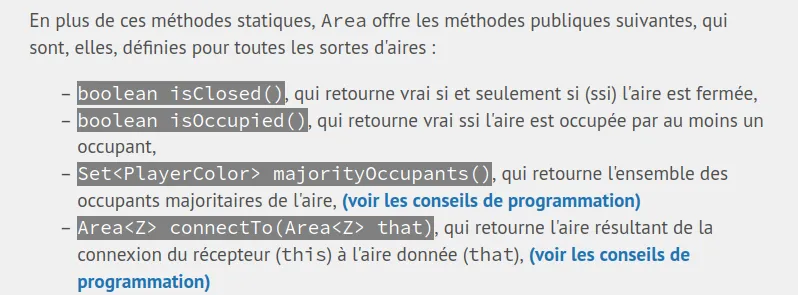
The final result will allow us to highlight the methods and add a link to jump to the tips specific to each method without delay
There are dozens of extensions that allow implementing these userscripts. We’ll use ViolentMonkey, which is open source and well-maintained.
TL;DR the link to the final script (to import into ViolentMonkey)
Detecting method definitions
First, we need to detect the methods present in the instructions. This can be done using the following instruction:
const methods = new Set();

const listItems = document.querySelectorAll('li');
for (listItem of listItems) {

    const firstCode = listItem.querySelector('code:first-of-type');
    if (firstCode) {
        firstCode.style.backgroundColor = '#808080';
        firstCode.style.color = 'white';

        console.log('[METHOD] method definition found, ' + firstCode.innerText);
        methods.add(firstCode);
    }
}
To do this, we took the first element formatted as code in each list. We apply a gray background and change the text color.
We also store the method in a Set, which will be useful later.
Detecting programming tips
Secondly, we want to detect programming tips. We can use our previous code to check if the section title is “Programming Tips”.
const listItems = document.querySelectorAll('li');
for (listItem of listItems) {
    // are we in a programming tips section? :)
    const parentDiv = listItem.parentNode.parentNode;
    const isConseilsDeProg = parentDiv.id.includes('outline-container') && parentDiv.children[0].innerHTML.includes('Conseils de programmation');
    if (isConseilsDeProg) conseilsDeProg.add(parentDiv);
}
Linking the two
Finally, we can link the two using this piece of code that matches a method and a tip and creates a link tag <a> to jump to the right tip.
conseilsDeProg.forEach((parentDiv) => {

  const titles = parentDiv.querySelectorAll('li > code:first-of-type');
  for (title of titles) {
    console.log('[TIP] tip found for method ' + title.innerText);
    const id = title.parentNode.children[0].id;

    for (method of methods) {
      if (method.innerText.includes(title.innerText)) {
        console.log('[MATCHING] tip for ' + title.innerText + ' matched');
        const a = document.createElement('a');
        a.innerHTML = '<b> (see programming tips) </b>';
        a.href = '#' + id;
        method.parentNode.appendChild(a);
      }
    }
  }

});
Finally, we loop over all the titles to add a reference link to them:
for (header of document.querySelectorAll('h3, h4, h5, h6')) {
  console.log(header.id);
  const a = document.createElement('a');
  a.href = 'javascript:void(0)';
  a.innerText = '(📋)';
  a.style.marginLeft = '5px';
  header.appendChild(a);
  const link = `${window.location.origin}${window.location.pathname}#${header.id}`;
  a.onclick = () => {
    a.innerText = '(✅ link copied)';
    setTimeout(() => a.innerText = '(📋)', 1_000);
    navigator.clipboard.writeText(link).then(function() {
      console.log('Async: Copying to clipboard was successful!');
    }, function(err) {
      console.error('Async: Could not copy text: ', err);
    });
  }
}